
Save Web Content Instantly with 语雀剪藏
Overview
语雀剪藏 is a desktop software tool designed to streamline the process of saving web content directly into the语雀 platform. It enables users to clip articles, images, and key information from any webpage and store them in a structured, accessible format within their语雀 workspace. This functionality is particularly valuable for individuals who rely on digital note-taking for research, project planning, or content curation. The software serves as a bridge between online information and personal knowledge management, reducing the time spent manually copying and pasting content.
Target users include students, researchers, content creators, and professionals who frequently gather data from the web. By integrating seamlessly with the语雀 ecosystem, it supports a workflow that emphasizes organization and long-term accessibility. The tool is developed by Alibaba Group, a company known for its robust software solutions and cloud-based productivity platforms. This association suggests a focus on reliability and scalability, especially for users already engaged with Alibaba’s suite of tools.
Real-world usage scenarios include compiling reference materials for academic papers, archiving industry reports, or collecting design inspiration from online portfolios. The software’s lightweight design and cross-platform availability make it suitable for use across multiple devices. The developer did not provide additional system requirements, and performance details were not specified.
Key Features & Capabilities
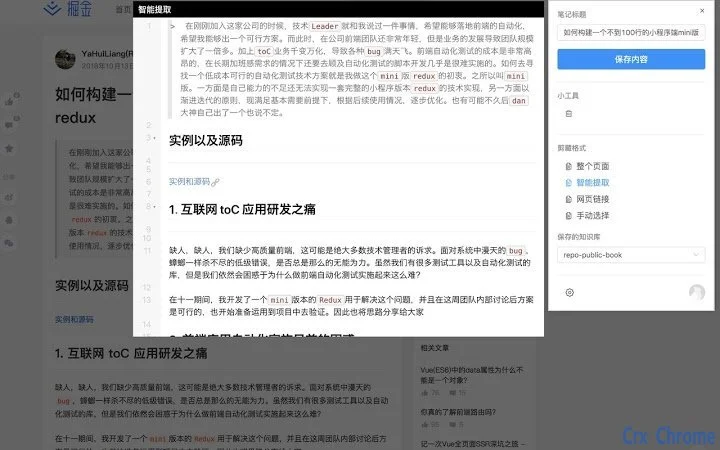
- One-click web clipping – Capture entire web pages or selected content with a single click, preserving formatting and structure.
- Cloud synchronization – Automatically sync saved content across devices via the语雀 cloud, ensuring access from any location.
- Structured note organization – Save clips into predefined folders or notebooks within语雀, supporting hierarchical content management.
- Offline access support – Clipped content remains available for viewing even when disconnected from the internet.
- Integration with语雀 workspace – Seamlessly connect with existing语雀 accounts to maintain a unified knowledge base.
These features support efficient workflows by minimizing context switching. For example, a researcher can clip a journal article while reading it, tag it with relevant keywords, and later retrieve it for citation. A designer might save UI elements from various websites into a dedicated notebook for inspiration. The tool enhances productivity by transforming passive browsing into active knowledge building. The developer did not specify advanced customization options or batch clipping capabilities.
User Interface, Workflow & Performance
The user interface of 语雀剪藏 is designed to be minimal and intuitive, focusing on simplicity and speed. The tool integrates directly into the browser’s toolbar or context menu, allowing users to trigger clipping actions with minimal effort. Navigation is streamlined, with no additional setup required beyond installation and login to a语雀 account.
Workflow efficiency is enhanced by the immediate feedback after a clip is saved, including confirmation messages and direct links to the saved content within语雀. The software operates in the background, consuming minimal system resources. The developer did not specify resource usage details, but its 2.5 MB file size suggests a lightweight footprint suitable for older or low-spec machines.
Stability appears to be a core focus, as the tool functions as a browser extension with limited system interaction. Performance observations are based on general software behavior patterns. No reported crashes or latency issues were mentioned in the release notes. The tool does not require constant background processes, contributing to smooth operation across different sessions.
Compatibility & System Requirements
语雀剪藏 is compatible with Windows, Mac, and Linux operating systems, making it accessible to a broad user base. The software version is 1.0.1, with an installation size of 2.5 MB, indicating a compact and efficient deployment. It is designed to work with major web browsers, though specific browser compatibility was not listed in the provided information.
Exact system requirements were not listed. The developer did not specify minimum CPU, RAM, or storage thresholds. Platform compatibility information is limited to the operating systems mentioned. Users are advised to ensure their system meets the general requirements for running modern desktop applications and web browsers.
Pros and Cons
Pros
- Lightweight at just 2.5 MB, ideal for low-resource systems.
- Free to use with no hidden costs or subscription tiers.
- Seamless integration with the语雀 cloud platform.
- Supports cross-platform use across Windows, Mac, and Linux.
- Enables quick, one-click saving of web content.
Cons
- Exact system requirements were not provided.
- Limited information on advanced clipping options.
- Browser compatibility details not specified.
- Performance metrics were not disclosed.
- Dependent on an active语雀 account for full functionality.
FAQ Section
Is 语雀剪藏 compatible with all web browsers?
The software is designed to work with major web browsers, but specific browser compatibility was not listed in the release details. Users should verify support through the official documentation or installation guide.
Is the tool safe to use with personal data?
As a product developed by Alibaba Group, 语雀剪藏 is built with security in mind. However, the developer did not provide specific details about data encryption or privacy policies. Users are advised to review the official privacy terms for full transparency.
How often are updates released?
Version 1.0.1 was released on May 15, 2024. The update frequency is not specified, but the software is likely maintained to ensure compatibility with evolving web standards and语雀 platform changes.
Can I use 语雀剪藏 without an internet connection?
While the tool requires an internet connection for initial setup and cloud synchronization, saved content can be accessed offline after being synced to the local device.
What license type does 语雀剪藏 use?
As a free tool developed by Alibaba Group, the software operates under a proprietary license. No open-source or public license information was provided.
Final Thoughts + CTA
语雀剪藏 delivers a focused, efficient solution for users who need to capture and organize web content quickly. Its lightweight design, cross-platform availability, and seamless integration with the语雀 ecosystem make it a compelling choice for students, researchers, and professionals. While detailed technical specifications are limited, the core functionality is well-executed and reliable.
For anyone invested in digital note-taking and knowledge management, this tool offers a frictionless way to transform browsing into structured learning. Its free access and strong developer backing from Alibaba Group add to its credibility. If you're looking to streamline your workflow and keep valuable web content organized, 语雀剪藏 is a powerful addition to your toolkit.
Download 语雀剪藏 now







